Business Forms
Fill Out a Purchase Order Online
Fill out a purchase order online — list the items, quantities, prices, and delivery terms you're ordering from a vendor, then send a professional PDF.
Start for $1. After 7 days, your subscription renews at $39.99/month unless cancelled. Cancel anytime.
Why businesses use purchase orders
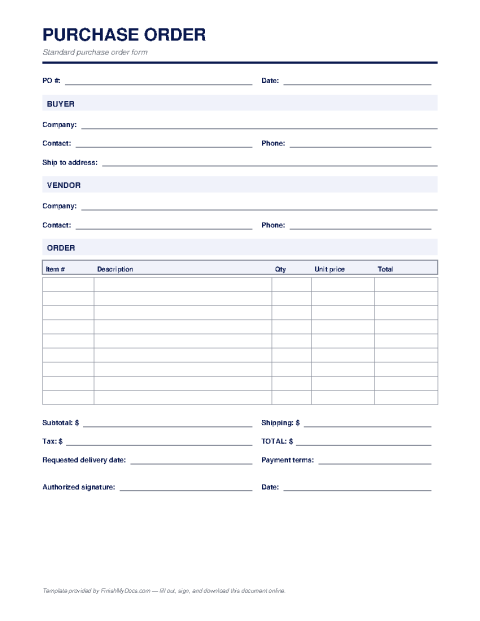
A purchase order (PO) is a buyer's formal offer to purchase: it tells a vendor exactly what you want, in what quantity, at what price, delivered where and by when. Once the vendor accepts, the PO becomes a binding agreement — which is precisely its value. It replaces "I thought we agreed on fifty units" with a numbered document both sides can point to, and it gives your bookkeeper a clean way to match invoices against what was actually ordered.
The anatomy of a PO
A complete purchase order carries a unique PO number, the issue date, buyer and vendor details, a shipping address, itemized lines with descriptions, quantities, unit prices, and line totals, plus the subtotal, tax, shipping, and grand total. Delivery date, payment terms (Net 30 is common), and any special instructions round it out. The PO number matters more than it looks — it's the thread that ties the order, the delivery, and the invoice together in three-way matching.
Creating yours online
Fill in the FinishMyDocs template in your browser: add vendor details, line items, and terms, then download a polished PDF to email to your supplier. Your issued POs stay in your dashboard, giving even a one-person shop a real audit trail without procurement software. When the vendor's invoice arrives, a thirty-second comparison against the PO catches pricing and quantity errors before you pay them.
How to fill out this document online
-
1
Assign a PO number and date
Give the order a unique PO number and issue date — this number ties the order, delivery, and invoice together later.
-
2
Add buyer and vendor details
Enter your company's billing and shipping information and the vendor's name and address.
-
3
Itemize the order
List each item with a description, quantity, unit price, and line total, then complete the subtotal, tax, shipping, and grand total.
-
4
Set terms and send
Fill in the delivery date and payment terms, download the PDF, and email it to your vendor. Keep the copy in your dashboard for invoice matching.
Edit, sign, download, print, or email
Open Purchase Order Template in the FinishMyDocs editor to type into every field, add today's date, place checkmarks, highlight key sections, and sign by drawing, typing, or uploading your signature. Need someone else's signature? Send them a secure signing link and get notified the moment they're done.
When you're finished, download the completed PDF, export pages as PNG or JPEG images, print a flattened copy, or email it straight to any recipient — your work is saved to your private account the whole time.
Frequently asked questions
Related forms & templates
Business Expense Report
Fill out a business expense report online — log dates, categories, amounts, and totals, then sign an
Invoice Template
Create a professional invoice online in minutes — add your business details, line items, and payment
Receipt Template
Create a payment receipt online — record the payer, amount, date, and what was paid for, then downlo