
Tax Forms
Fill Out a W-4 Form Online
Complete the IRS W-4 Employee's Withholding Certificate online to tell your employer how much federal income tax to withhold from your paycheck.
Start for $1. After 7 days, your subscription renews at $39.99/month unless cancelled. Cancel anytime.
This is an official U.S. government form reproduced for convenience. FinishMyDocs.com is a private document service, not affiliated with the IRS or any government agency. The official form is available free at IRS.gov. Consult a qualified tax professional for advice about your withholding. Official source: https://www.irs.gov/forms-pubs/about-form-w-4
Understanding the W-4
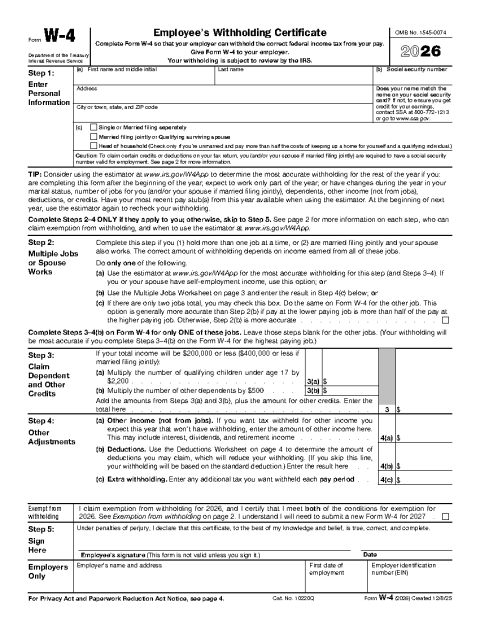
The W-4, Employee's Withholding Certificate, tells your employer how much federal income tax to take out of each paycheck. Get it right and your withholding roughly matches what you owe; get it wrong and you either hand the IRS an interest-free loan all year or face a surprise bill in April. Since the 2020 redesign, the form no longer uses "allowances" — instead it walks through filing status, multiple jobs, dependents, and other adjustments.
When should you fill out a new W-4?
Every new employee completes a W-4 at hiring, but you can submit a revised one to your employer at any time. Common triggers include getting married or divorced, having a child, picking up a second job, a spouse starting or stopping work, or a large refund or balance due on last year's return. You give the completed form to your employer's payroll department — it never goes to the IRS directly.
Key sections to pay attention to
Step 1 covers your name, Social Security number, and filing status. Step 2 matters if you hold more than one job or your spouse works; Step 3 lets you claim the child tax credit and credit for other dependents; Step 4 handles other income, deductions, and any extra withholding you want per paycheck. Step 5 is your signature — the form is not valid without it.
Completing it online
FinishMyDocs lets you type into each field, check the correct filing-status box, do the dependent math without scribbles, and e-sign the certificate. Download the finished PDF and hand it to HR or upload it to your payroll portal, keeping a copy for yourself.
How to fill out this document online
-
1
Load the W-4 in the editor
Open the current W-4 template in your browser. All five steps of the form are fillable on screen.
-
2
Complete Steps 1–4
Enter your personal information and filing status, then work through the multiple-jobs, dependents, and adjustments sections that apply to you.
-
3
Sign and date Step 5
Add your electronic signature and the date. An unsigned W-4 is not valid, so don't skip this step.
-
4
Deliver it to payroll
Download the completed PDF and give it to your employer's HR or payroll team — by email, upload, or printed copy.
Edit, sign, download, print, or email
Open W-4 Form (Employee's Withholding Certificate) in the FinishMyDocs editor to type into every field, add today's date, place checkmarks, highlight key sections, and sign by drawing, typing, or uploading your signature. Need someone else's signature? Send them a secure signing link and get notified the moment they're done.
When you're finished, download the completed PDF, export pages as PNG or JPEG images, print a flattened copy, or email it straight to any recipient — your work is saved to your private account the whole time.
Frequently asked questions
Related forms & templates
Form 1099-MISC
Prepare Form 1099-MISC online for rents, royalties, prizes, and other miscellaneous payments. Ideal
Employment Application Form
Fill out a standard employment application online — personal details, work history, education, and r
W-9 Form
Fill out the IRS W-9 Request for Taxpayer Identification Number and Certification online, then sign