
Tax Forms
Fill Out a W-9 Form Online
Fill out the IRS W-9 Request for Taxpayer Identification Number and Certification online, then sign and download it as a finished PDF.
Start for $1. After 7 days, your subscription renews at $39.99/month unless cancelled. Cancel anytime.
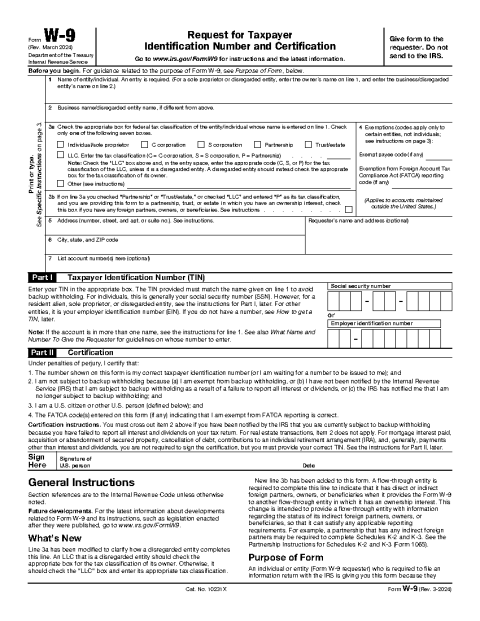
This is an official U.S. government form reproduced for convenience. FinishMyDocs.com is a private document service, not affiliated with the IRS or any government agency. The official form is available free at IRS.gov. Consult a qualified tax professional for advice about your situation. Official source: https://www.irs.gov/forms-pubs/about-form-w-9
What is a W-9 form?
Form W-9, Request for Taxpayer Identification Number and Certification, is the IRS form a business uses to collect your legal name, address, and taxpayer identification number (usually a Social Security number or EIN) before paying you as a non-employee. The payer keeps the form on file and uses the information to prepare year-end statements such as Form 1099-NEC or 1099-MISC. You do not send a W-9 to the IRS yourself — it goes to the company that asked for it.
Who needs to complete one?
Freelancers, independent contractors, consultants, landlords receiving rent through a property manager, and vendors paid $600 or more in a year are the most common W-9 filers. Banks and brokerages may also request one before opening an account. If you operate through an LLC or corporation, the form lets you indicate your federal tax classification so the payer reports your income correctly.
Filling it out online
The form itself is short: name, business name if different, tax classification checkbox, address, TIN, and a signature certifying the information is accurate. On FinishMyDocs you can type directly into each field, check the right classification box, add your signature electronically, and download a clean, legible PDF — no printing and rescanning a crumpled copy.
Once finished, send the signed PDF to the requester and keep a copy for your records. If your name, address, or tax classification changes later, you should provide an updated W-9.
How to fill out this document online
-
1
Open the W-9 template
Click "Fill This Form" to load the current W-9 in our browser editor — no download or software install needed.
-
2
Enter your taxpayer details
Type your legal name, business name if you have one, address, and SSN or EIN, and tick the box for your federal tax classification.
-
3
Sign electronically
Add your signature by drawing, typing, or uploading it, and date the certification section at the bottom of the form.
-
4
Download and send
Download your completed W-9 as a PDF, then email or print it for the business that requested it. Your copy stays in your dashboard.
Edit, sign, download, print, or email
Open W-9 Form in the FinishMyDocs editor to type into every field, add today's date, place checkmarks, highlight key sections, and sign by drawing, typing, or uploading your signature. Need someone else's signature? Send them a secure signing link and get notified the moment they're done.
When you're finished, download the completed PDF, export pages as PNG or JPEG images, print a flattened copy, or email it straight to any recipient — your work is saved to your private account the whole time.
Frequently asked questions
Related forms & templates
Form 1099-MISC
Prepare Form 1099-MISC online for rents, royalties, prizes, and other miscellaneous payments. Ideal
Independent Contractor Agreement
Complete an independent contractor agreement online — scope, payment, deadlines, IP ownership, and t
W-4 Form (Employee's Withholding Certificate)
Complete the IRS W-4 Employee's Withholding Certificate online to tell your employer how much federa
Independent Contractor W-9 Packet
An onboarding packet for new contractors — a cover sheet, contact and payment details, and a checkli