
Business Forms
Create an Invoice Online
Create a professional invoice online in minutes — add your business details, line items, and payment terms, then download or email a polished PDF.
Start for $1. After 7 days, your subscription renews at $39.99/month unless cancelled. Cancel anytime.
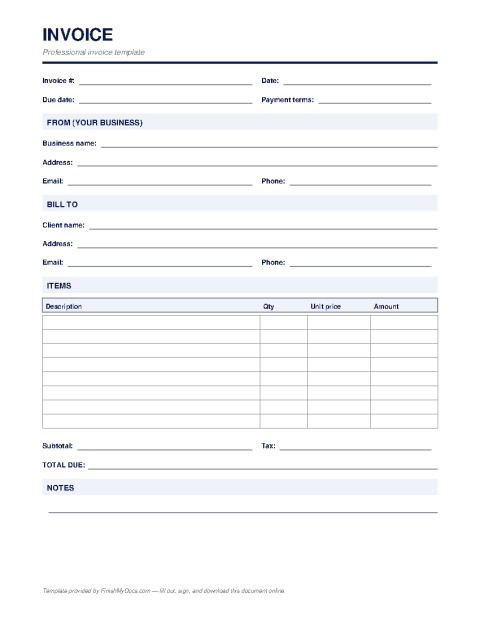
A professional invoice, without the spreadsheet wrestling
An invoice is the document that turns finished work into money in the bank: it tells your client exactly what they owe, for what, and by when. A clear invoice gets paid faster — studies of small-business cash flow consistently show that ambiguous or sloppy invoices sit at the bottom of the pile. This template gives you a clean, standard layout that works for freelancers, agencies, trades, and product sellers alike.
What a complete invoice includes
At minimum: your business name and contact details, the client's billing details, a unique invoice number, the issue date, itemized lines with quantities and rates, subtotal, any tax, the total due, payment terms (such as Net 30), and how to pay you. Adding a short note — a thank-you or a late-fee policy — is optional but often worthwhile.
Filling it out online
Open the template in the FinishMyDocs editor and type straight into each field: no Excel formulas to break, no fighting Word tables. Add as many line items as you need, set your terms, and the result is a consistent, professional PDF every time. Your invoices stay in your dashboard, so duplicating last month's invoice for a repeat client takes seconds.
When you're done, download the PDF to attach to an email, print it for a paper trail, or send it directly. Keep numbering sequential — it makes bookkeeping and tax time dramatically easier.
How to fill out this document online
-
1
Add your business details
Enter your business name, address, email, and phone at the top of the template — this becomes your invoice letterhead.
-
2
Bill the right client
Fill in the client's name and billing address, assign a unique invoice number, and set the issue and due dates.
-
3
Itemize the work
List each product or service with a description, quantity, and rate, then enter the subtotal, tax, and total due.
-
4
Send and get paid
Download the finished PDF and email it to your client, or print it. The invoice stays in your dashboard for easy duplication next time.
Edit, sign, download, print, or email
Open Invoice Template in the FinishMyDocs editor to type into every field, add today's date, place checkmarks, highlight key sections, and sign by drawing, typing, or uploading your signature. Need someone else's signature? Send them a secure signing link and get notified the moment they're done.
When you're finished, download the completed PDF, export pages as PNG or JPEG images, print a flattened copy, or email it straight to any recipient — your work is saved to your private account the whole time.
Frequently asked questions
Related forms & templates
Business Expense Report
Fill out a business expense report online — log dates, categories, amounts, and totals, then sign an
Purchase Order Template
Fill out a purchase order online — list the items, quantities, prices, and delivery terms you're ord
Receipt Template
Create a payment receipt online — record the payer, amount, date, and what was paid for, then downlo