Employment Forms
Fill Out an Employment Application Online
Fill out a standard employment application online — personal details, work history, education, and references — and download a clean, professional PDF.
Start for $1. After 7 days, your subscription renews at $39.99/month unless cancelled. Cancel anytime.
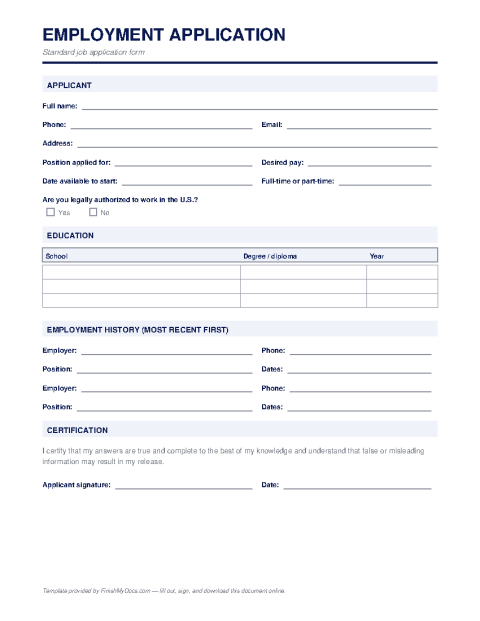
The standard job application, done neatly
Plenty of employers — especially in retail, hospitality, trades, healthcare, and small business — still ask candidates to complete a formal employment application, even when a resume is on file. Unlike a resume, the application is a structured, signed document: it asks the same questions of every candidate and includes a certification that the answers are true, which is why employers rely on it.
What the form covers
Expect fields for your contact information, the position and availability, work eligibility, employment history with dates, supervisors, and reasons for leaving, education, relevant skills or licenses, and professional references. The final section is a signed statement certifying accuracy and, often, authorizing the employer to verify the information provided.
Why fill it out online?
A typed application is simply easier to read than handwriting squeezed into small boxes — and easier for you, too, since you can revise an answer without starting over. With FinishMyDocs you complete every field in the browser, e-sign the certification, and download a crisp PDF to email to the hiring manager or print and hand in. The saved copy in your dashboard also means your dates and references are ready the next time an application asks for them.
How to fill out this document online
-
1
Start with the basics
Enter your name, contact details, the position you're applying for, your availability, and your work-eligibility answer.
-
2
Add your work history
List previous employers with dates, job titles, supervisors, and reasons for leaving — most recent first.
-
3
Complete education and references
Fill in schools, degrees or certifications, relevant skills, and two or three professional references with contact details.
-
4
Sign and submit
E-sign the certification statement, download the PDF, and email it to the employer or print it to hand in with your resume.
Edit, sign, download, print, or email
Open Employment Application Form in the FinishMyDocs editor to type into every field, add today's date, place checkmarks, highlight key sections, and sign by drawing, typing, or uploading your signature. Need someone else's signature? Send them a secure signing link and get notified the moment they're done.
When you're finished, download the completed PDF, export pages as PNG or JPEG images, print a flattened copy, or email it straight to any recipient — your work is saved to your private account the whole time.
Frequently asked questions
Related forms & templates
Non-Disclosure Agreement (NDA) Template
Fill out a non-disclosure agreement online — define the confidential information, term, and obligati
Resignation Letter Template
Write a professional resignation letter online — set your final day, keep the tone gracious, and dow
W-4 Form (Employee's Withholding Certificate)
Complete the IRS W-4 Employee's Withholding Certificate online to tell your employer how much federa