Employment Forms
Write a Resignation Letter Online
Write a professional resignation letter online — set your final day, keep the tone gracious, and download a polished PDF to give your employer.
Start for $1. After 7 days, your subscription renews at $39.99/month unless cancelled. Cancel anytime.
Leaving well, in writing
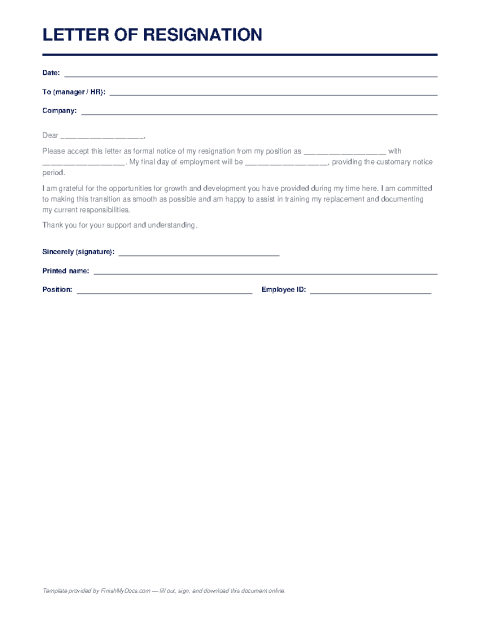
A resignation letter is the short, formal document that puts your departure on the record: that you're resigning, when your last day will be, and — optionally — a line of thanks. Even when you've already told your manager in person, HR usually needs the letter for your file, and a written date protects you if there's ever a question about notice or final pay.
What to say (and what to leave out)
The strongest resignation letters are brief: a statement of resignation, your final working day (two weeks' notice is the convention in the U.S., though check your contract), a sentence of appreciation, and an offer to help with the transition. Leave out grievances, explanations of where you're going, and anything you wouldn't want read aloud in a reference call two years from now. Hiring circles are small; a gracious exit is an asset.
Completing it online
This template gives you the structure — date, recipient, body, sign-off — so you only fill in the specifics. Type your details in the FinishMyDocs editor, adjust the wording to fit your voice, add your signature, and download a clean PDF to email to your manager and HR. Keep a copy: your notice date occasionally matters for benefits, vesting, and unemployment questions.
How to fill out this document online
-
1
Address it properly
Fill in the date, your manager's name and title, and the company name at the top of the letter.
-
2
State your resignation and last day
Complete the body with your position and final working day — typically two weeks out, or whatever your contract requires.
-
3
Keep the tone gracious
Use the optional lines to thank your employer and offer transition help. Skip grievances entirely.
-
4
Sign and deliver
Add your signature, download the PDF, and email it to your manager and HR — keeping a dated copy for your own records.
Edit, sign, download, print, or email
Open Resignation Letter Template in the FinishMyDocs editor to type into every field, add today's date, place checkmarks, highlight key sections, and sign by drawing, typing, or uploading your signature. Need someone else's signature? Send them a secure signing link and get notified the moment they're done.
When you're finished, download the completed PDF, export pages as PNG or JPEG images, print a flattened copy, or email it straight to any recipient — your work is saved to your private account the whole time.
Frequently asked questions
Related forms & templates
Employment Application Form
Fill out a standard employment application online — personal details, work history, education, and r
Non-Disclosure Agreement (NDA) Template
Fill out a non-disclosure agreement online — define the confidential information, term, and obligati
W-4 Form (Employee's Withholding Certificate)
Complete the IRS W-4 Employee's Withholding Certificate online to tell your employer how much federa