Business Forms
Complete a Contractor W-9 Packet Online
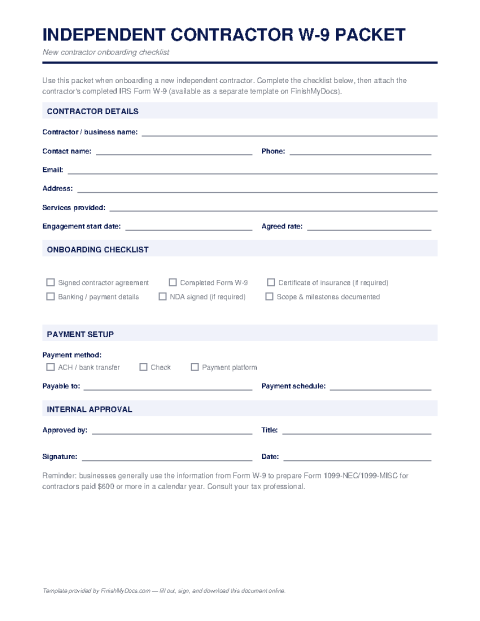
An onboarding packet for new contractors — a cover sheet, contact and payment details, and a checklist that pairs with the official IRS W-9 form.
Start for $1. After 7 days, your subscription renews at $39.99/month unless cancelled. Cancel anytime.
FinishMyDocs.com is a private document service and this packet is a convenience tool, not tax advice. It is meant to be used alongside the official IRS Form W-9, which is available free at IRS.gov. Consult a qualified tax professional with questions about contractor reporting requirements.
Onboard contractors once, correctly
Every business that hires freelancers faces the same January scramble: 1099s are due and somebody's W-9 is missing, outdated, or illegible. The Independent Contractor W-9 Packet solves that at the start of the relationship instead of the end. It's an onboarding bundle — a cover sheet, a contractor information form for contact and payment details, and a compliance checklist — designed to be completed alongside the official IRS Form W-9, which is available free at IRS.gov and which we also offer as a fillable template.
What's in the packet
The cover sheet explains to your new contractor what you need and why. The information form captures everything the W-9 doesn't: preferred payment method and remittance details, points of contact, an emergency contact, and insurance certificate details if your work requires them. The checklist tracks each onboarding item — signed agreement, completed W-9, payment setup, any required certificates — so nothing is missing when the first invoice arrives or when 1099 season comes around.
Using it online
Fill out the packet in the FinishMyDocs editor, or send your contractor a blank copy to complete and return alongside their signed W-9. Completed packets live in your dashboard, giving you a single place to look up any contractor's details. Pair each packet with an independent contractor agreement and the official W-9 and your paperwork is genuinely done.
How to fill out this document online
-
1
Fill in the business and contractor details
Enter your company information and the contractor's name, business entity, and contact details on the information form.
-
2
Capture payment information
Record the contractor's preferred payment method and remittance details so the first invoice can be paid without back-and-forth.
-
3
Work through the checklist
Mark off each onboarding item — signed agreement, completed official W-9, insurance certificates if required — as it's collected.
-
4
Save and file the packet
Download the finished PDF and store it with the contractor's signed W-9. Your dashboard copy makes 1099 season a lookup, not a hunt.
Edit, sign, download, print, or email
Open Independent Contractor W-9 Packet in the FinishMyDocs editor to type into every field, add today's date, place checkmarks, highlight key sections, and sign by drawing, typing, or uploading your signature. Need someone else's signature? Send them a secure signing link and get notified the moment they're done.
When you're finished, download the completed PDF, export pages as PNG or JPEG images, print a flattened copy, or email it straight to any recipient — your work is saved to your private account the whole time.
Frequently asked questions
Related forms & templates
Form 1099-MISC
Prepare Form 1099-MISC online for rents, royalties, prizes, and other miscellaneous payments. Ideal
Independent Contractor Agreement
Complete an independent contractor agreement online — scope, payment, deadlines, IP ownership, and t
W-9 Form
Fill out the IRS W-9 Request for Taxpayer Identification Number and Certification online, then sign